
- 500,000 words per month
- 200,000 words per document
- Suggestions panel
- Save custom prompts
- Import/export Word documents
- Revision history
- Data safety and privacy
- $96 billed annually

editGPT
0
editGPT lets you proofread, edit, and improve writing with AI while reviewing changes before accepting them. Choose an editing depth, from grammar fixes to a full rewrite, or use custom prompts to guide edits. It supports more than 80 languages, preserves rich-text formatting, and lets you import and export Word documents with tracked changes. Plans include word limits for individual users and team options for organizations.
Promote this Tool
Update this Tool
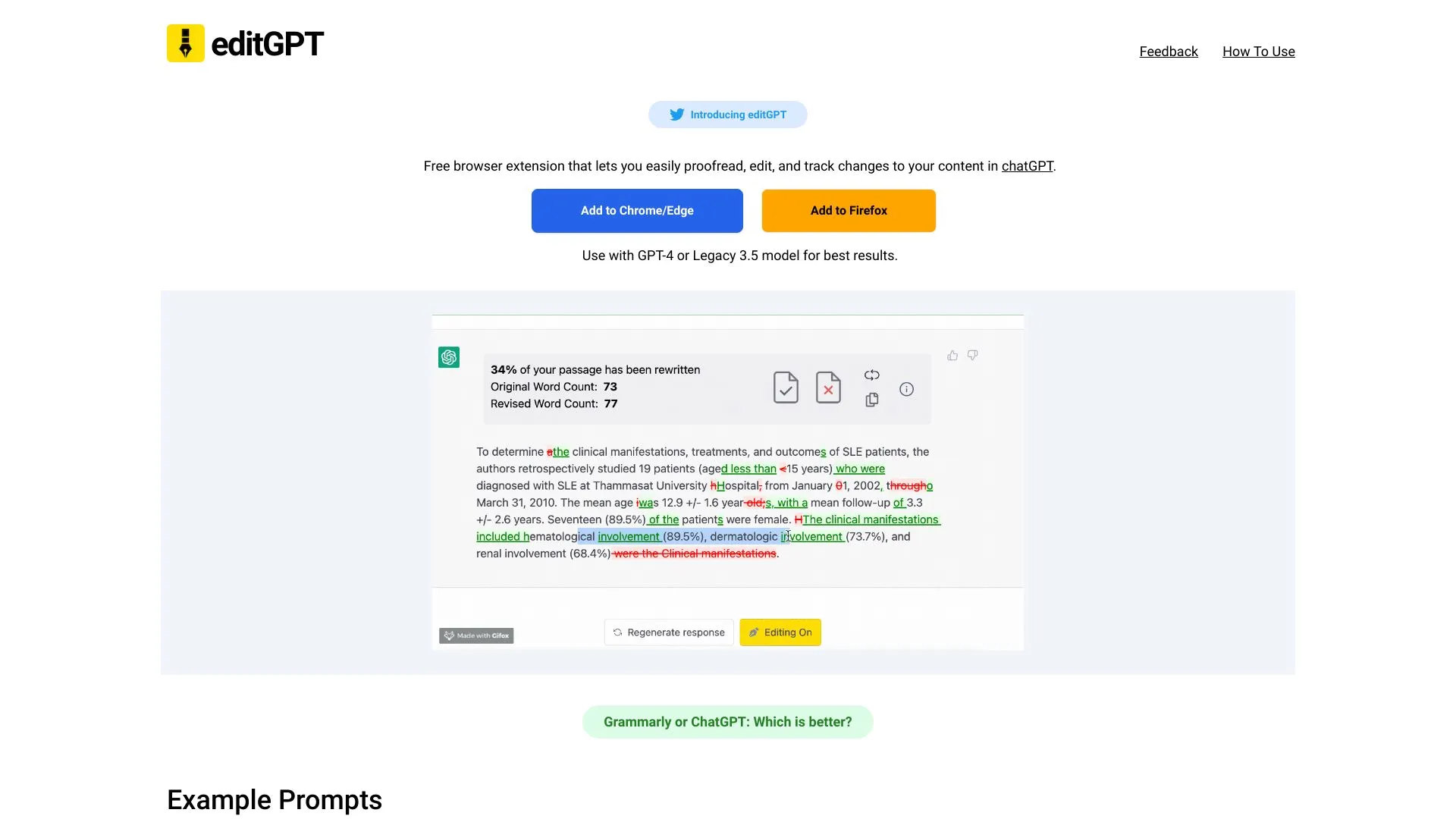
editGPT lets you proofread, edit, and improve writing with AI while reviewing changes before accepting them. Choose an editing depth, from grammar fixes to a full rewrite, or use custom prompts to guide edits. It supports more than 80 languages, preserves rich-text formatting, and lets you import and export Word documents with tracked changes. Plans include word limits for individual users and team options for organizations.
Ads
What is editGPT?
editGPT applies AI-assisted edits to writing, with five levels of intervention: Fix Grammar, Proofread, Natural, Improve, and Rewrite. A tracked-changes interface shows revisions so users can review edits rather than replace text blindly. Users can write custom prompts and save them on paid plans. The editor supports more than 80 languages or automatic language detection, and preserves formatting such as bold and italics. For Word workflows, users can import and export .docx files with tracked changes, and paid plans include revision history and a suggestions panel. Pro and Elite plans have monthly word allowances and per-document limits; Business adds unlimited words and requests, team management, and four included seats. editGPT states that it keeps user data private and does not use it for AI training.
Who will use editGPT?
- Writers and authors
- Students and researchers
- Professionals editing work documents
- Editors and proofreaders
- Multilingual writers
- Teams and organizations
How to use the editGPT?
- Step1: Open editGPT and start an editing session.
- Step2: Enter or import the text you want to edit; for Word documents, import a .docx file.
- Step3: Choose an editing depth, from grammar fixes to a full rewrite, or provide a custom prompt.
- Step4: Review the suggested revisions and tracked changes, then accept or adjust the edits.
- Step5: Export the finished document as a .docx file if needed.
Platform
- Web
- Chrome Extensions
editGPT's Core Features & Benefits
The Core Features
- AI proofreading and rewriting at adjustable editing depths
- Tracked changes and revision review
- Custom editing prompts and saved prompts
- Editing in more than 80 languages with automatic language detection
- Word document import and export with formatting preserved
- Suggestions panel and revision history on paid plans
The Benefits
- Review and control edits before accepting them
- Match the degree of editing to the task
- Work across multiple languages
- Keep Word formatting and tracked changes in document workflows
- Use custom instructions to tailor revisions
editGPT's Main Use Cases & Applications
- Proofreading essays, reports, and business writing
- Rewriting drafts for clarity and natural phrasing
- Editing Word documents while retaining tracked changes
- Improving writing in languages other than English
- Applying consistent custom editing instructions
- Reviewing revisions across writing projects
editGPT's Pros & Cons
The Pros
Offers several editing depths, from grammar correction to rewriting
Shows changes for review instead of silently replacing the original text
Supports more than 80 languages and preserves rich-text formatting
Imports and exports Word documents with tracked changes
Business plan includes unlimited words and requests
The Cons
Pro and Elite plans cap monthly usage at 500,000 and 3,000,000 words respectively, with a 200,000-word document limit
The listed paid plans start at $8 per month, while higher-volume and team capabilities require more expensive plans
editGPT's Pricing
| Has free plan | YES |
|---|---|
| Free trial details | |
| Pricing model | freemium |
| Is credit card required | No |
| Paid from | 15 USD |
| Has lifetime plan | No |
| Billing frequency | monthly/yearly |
Details of Pricing Plan
Pro
15 USDElite
25 USD- 3,000,000 words per month
- 200,000 words per document
- Suggestions panel
- Save custom prompts
- Import/export Word documents
- Revision history
- Data safety and privacy
- $180 billed annually
Business
100 USD- Unlimited words per month
- Unlimited requests
- 4 team seats included
- Team management dashboard
- All Pro and Elite features
- $720 billed annually
Discount:Save up to 40% on annual plans.
For the latest prices, please visit: https://www.editgpt.appFAQs of editGPT
editGPT Company Information
- Website:
- Company Name: editGPT
- Support Email:
- Facebook:
- X(Twitter):
- YouTube:
- Instagram:
- Tiktok:
- LinkedIn:
Analytic of editGPT
Visit Over Time
Monthly Visits
198.1K
Avg Visit Duration
00:01:03
Page Per Visit
2.04
Bounce Rate
41.56%
Jul 2026 - Sep 2026 All Traffic
Geography
Top 5 Regions

United States
44.71%
United Kingdom
9.03%
Canada
7.23%
Philippines
5.11%
Thailand
3.32%
Jul 2026 - Sep 2026 Worldwide Desktop Only
Traffic Sources
Direct
58.32%
SearchOrganic
29.50%
SocialOrganic
3.73%
Referrals
2.78%
SearchPaid
2.65%
GenAi
2.46%
Mail
0.45%
DisplayAds
0.10%
SocialPaid
0.02%
Sep 2026 Desktop Only
Top Keywords
| Keyword | Traffic | Cost Per Click |
|---|---|---|
| editgpt | 8.6k | $7.46 |
| edit chatgpt | 1.4k | — |
| edit gpt | 850 | $2.58 |
| zerogpt humanizer | 12.3k | $0.33 |
| infront or in front | 3.6k | — |
editGPT Reviews
5/5
editGPT's Main Competitors and alternatives?
Grammarly
ProWritingAid
Hemingway Editor
You may also like:
Turn AI-generated drafts into more natural-sounding text, with multilingual rewriting and an integrated checker for AI detection.
AI-powered workspace to streamline immigration petitions with smart tools and expert guidance.
Phishr offers unlimited phishing simulations and security awareness training for users, 100% free.
Check AI-written text, refine drafts, and turn PDFs, videos, and audio into concise summaries, transcripts, and study materials.
QuickPR offers comprehensive digital PR solutions to enhance brand visibility and credibility.
Readefine provides AI-powered reading enhancements for better comprehension and efficiency.