
- 8,000 credits monthly
- Up to 7 minutes of generation
- Up to 500 characters per generation
- 3 public voice slots
- Standard generation speed
- No credit card needed

Fish Speech
0
Fish Audio turns written scripts into expressive spoken audio, with controls for emotion, pauses, and delivery tags. Users can choose from a library of more than two million voices or create voice clones from short recordings, then generate narration for videos, audiobooks, characters, and chatbots. The service also offers speech-to-text, multilingual voice support, and APIs for integrating speech generation and cloning into apps.
Promote this Tool
Update this Tool
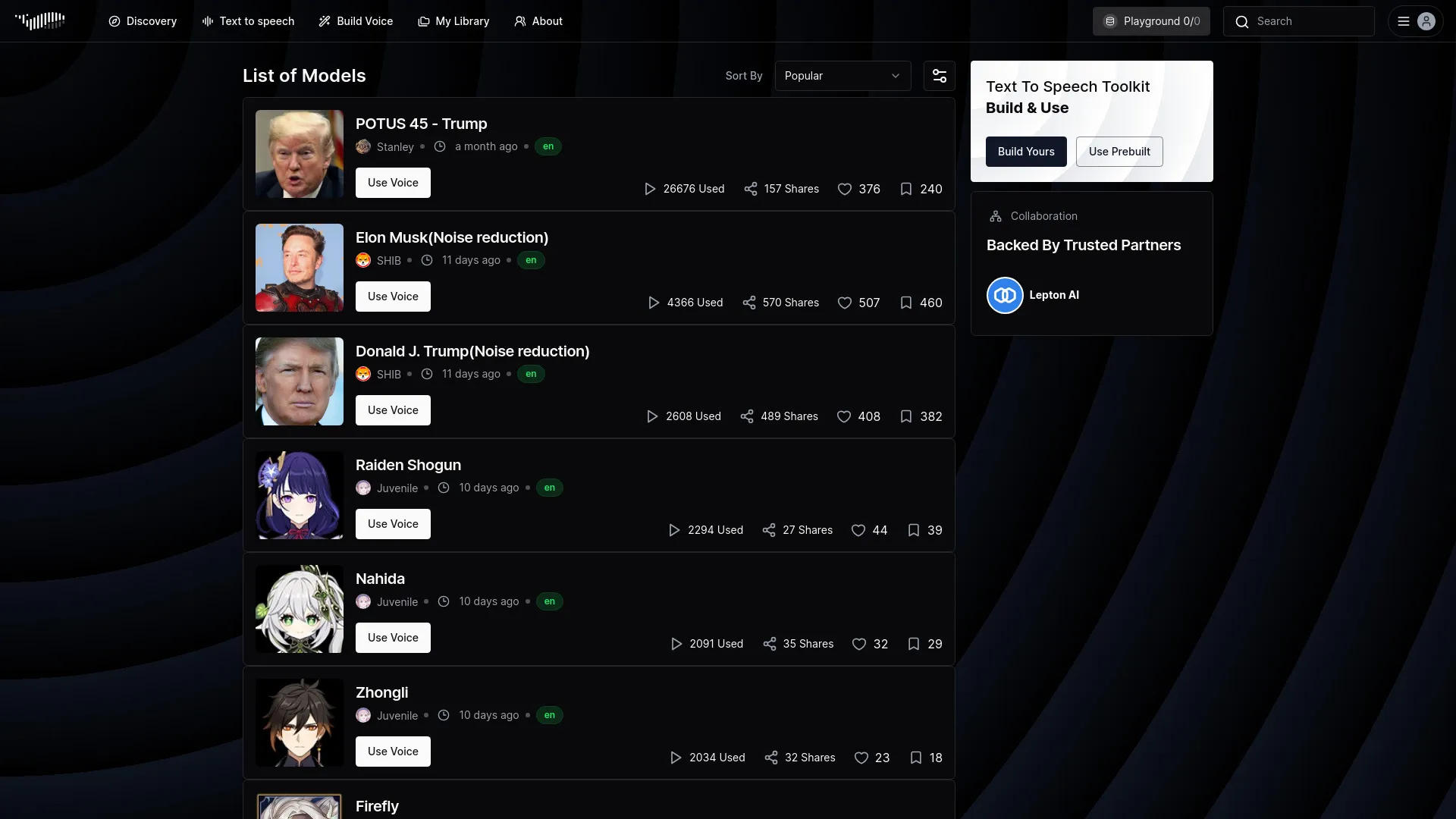
Fish Speech
Fish Audio turns written scripts into expressive spoken audio, with controls for emotion, pauses, and delivery tags. Users can choose from a library of more than two million voices or create voice clones from short recordings, then generate narration for videos, audiobooks, characters, and chatbots. The service also offers speech-to-text, multilingual voice support, and APIs for integrating speech generation and cloning into apps.
Ads
What is Fish Speech?
Fish Audio provides text-to-speech generation with controls for emotion, emphasis, whispering, pauses, and other vocal effects. Users can select from a library of more than two million voices or create a clone from a short voice recording. Its tools support narration for videos and audiobooks, character voices, and conversational chatbot responses, with multilingual voice generation across 30+ languages. Fish Audio also includes speech-to-text with multispeaker transcription and emotion tags, plus APIs, SDKs, and REST endpoints for developers building voice features into apps. The service offers real-time streaming and voice cloning, while its browser interface lets users enter text, choose a voice, generate speech, and preview the result.
Who will use Fish Speech?
- Video creators and YouTubers
- Audiobook producers and authors
- Game, animation, and interactive-story creators
- Businesses producing advertisements and explainers
- Developers building voice-enabled apps or chatbots
- Creators who need multilingual narration
How to use the Fish Speech?
- Step1: Open Fish Audio and sign up or log in.
- Step2: Choose text-to-speech and select a voice from the voice library, or create a voice clone from a recording.
- Step3: Enter or paste your script and add emotion or delivery tags, such as whispering, emphasis, or pauses.
- Step4: Select the language and adjust the voice and delivery to fit the intended content.
- Step5: Generate and play the speech, then revise the text or tags as needed.
- Step6: For app integrations, consult the developer documentation and use the API or SDKs.
Platform
- Web
- Android
- iOS
- Linux
- Mac
- Windows
Fish Speech's Core Features & Benefits
The Core Features
- Text-to-speech generation with emotion and delivery tags
- Voice cloning from short audio recordings
- Library of more than two million voices
- Speech-to-text transcription with multispeaker and emotion-tag support
- Multilingual voice generation in 30+ languages
- Real-time streaming and developer APIs
The Benefits
- Create narration without booking a recording session
- Adjust vocal delivery to suit characters, scenes, and scripts
- Produce voice content in multiple languages
- Add natural-sounding speech to apps and conversational agents
Fish Speech's Main Use Cases & Applications
- Video voiceovers for YouTube, advertisements, and explainers
- Audiobook narration with pacing and chapter-level control
- Character and brand voices for games, animation, and stories
- Spoken responses for customer-support chatbots and virtual agents
- Multilingual narration and voiceovers
- Speech features integrated into apps through APIs
Fish Speech's Pros & Cons
The Pros
Emotion tags provide control over vocal delivery, including whispers, pauses, and emphasis.
A large voice library and voice-cloning tools offer multiple ways to create narration.
Supports multilingual speech generation and real-time voice APIs.
Free monthly generations are available for personal use.
The Cons
The free plan is for personal use; commercial rights require a paid plan.
The free tier provides monthly generations rather than unrestricted use.
Using the API in an app requires developer integration work.
Fish Speech's Pricing
| Has free plan | YES |
|---|---|
| Free trial details | |
| Pricing model | freemium |
| Is credit card required | No |
| Paid from | 15 USD |
| Has lifetime plan | No |
| Billing frequency | monthly/yearly |
Details of Pricing Plan
Free Tier
0 USDPlus
15 USD- 250,000 credits monthly
- Up to 200 minutes of generation
- Up to 15,000 characters per generation
- Unlimited public and 10 private voice slots
- Priority generation on latest models
- Access to Voice Design
- 1 professional voice slot
- Enhanced voice cloning
- Commercial use allowed
- Also available billed annually
Pro
100 USD- 2,000,000 credits monthly
- Up to 1,620 minutes of generation
- 3 team seats included
- Up to 30,000 characters per generation
- Unlimited voice slots
- 5 professional voice slots
- 7-day money-back guarantee
- Includes everything in Plus
- Also available billed annually
Discount:Save 50% on Creator plans during the first year when billed annually; the Halloween sale is a limited-time offer.
For the latest prices, please visit: https://fish.audio/plan/FAQs of Fish Speech
Fish Speech Company Information
- Website:
- Company Name: Fish Audio
- Support Email:
- Facebook:
- X(Twitter):
- YouTube:
- Instagram:
- Tiktok:
- LinkedIn:
Analytic of Fish Speech
Visit Over Time
Monthly Visits
8.4M
Avg Visit Duration
00:05:35
Page Per Visit
6.41
Bounce Rate
34.50%
Jul 2026 - Sep 2026 All Traffic
Geography
Top 5 Regions

United States
14.88%
Brazil
6.61%
Russia
6.29%
Japan
5.28%
Mexico
4.53%
Jul 2026 - Sep 2026 Worldwide Desktop Only
Traffic Sources
Direct
43.61%
SearchOrganic
41.53%
SocialOrganic
6.77%
Referrals
2.81%
SearchPaid
1.96%
GenAi
1.60%
DisplayAds
1.09%
Mail
0.40%
SocialPaid
0.18%
Affiliate
0.06%
Sep 2026 Desktop Only
Top Keywords
| Keyword | Traffic | Cost Per Click |
|---|---|---|
| fish audio | 420.8k | $0.29 |
| fishaudio | 57.7k | $0.30 |
| fish audio ai | 16.7k | $0.25 |
| fish ai | 18.2k | $0.26 |
| фиш аудио | 6.8k | $0.14 |

How to install?
Fish Speech Reviews
5/5
Comments (1)

Seryozhka Kulinich
May 21 2026
Лучший сайт
Fish Speech's Main Competitors and alternatives?
You may also like:
Create downloadable speech from an authorized voice sample, with multilingual text input, adjustable delivery, and no sign-up trial.
Create commercial-ready images, videos, music, and voiceovers from prompts, references, and short audio samples in one workspace.
Generate downloadable UK English voiceovers by choosing from 185 RP, Scottish, Welsh, Northern Irish, and young British voices.
Create downloadable child voiceovers from scripts with 66 styles, ten languages, browser previews, and permitted voice cloning.
Browser-based AI text-to-speech tool for generating natural voiceovers, narration, and podcast audio from scripts.
Free online AI audio enhancer for clearer speech in podcasts, videos, and spoken recordings.
All-in-one AI audio studio for voice cloning, vocal conversion, music generation, stem splitting, and mastering.
AnySpeech is an AI voice studio that turns text into natural speech with 100+ voices in 50+ languages.
KikiVoice delivers realistic AI text-to-speech and voice cloning for creators, podcasts, and interactive content.
High-fidelity AI voice cloning platform offering TTS, voice conversion, APIs, and a community Voice Square library.
Voiceslab offers advanced AI voice cloning to create realistic replicas of your voice instantly.
VoiSpark offers advanced AI-powered voice generation, cloning, and modification tools for creators.
Capture and translate videos easily with Showcase Screen Recorder.
Live video calls with Santa Claus to create memorable holiday moments for children.
Turn scripts into expressive voiceovers in 154+ languages, then export finished audio as MP3 or WAV.
Create animated characters and cartoons easily with Tooning.io, the ultimate cartoon creation tool.