
Unfollow AI compares your Instagram followers and following lists to surface accounts that do not follow you back, ghost followers, inactive profiles, and suspected bots. From a single view, you can bulk-unfollow selected non-followers, protect chosen accounts with a whitelist, and skip verified profiles. The Chrome extension also tracks unfollower changes with browser notifications and keeps data in your browser; it supports Chrome and other Chromium browsers.
Promote this Tool
Update this Tool
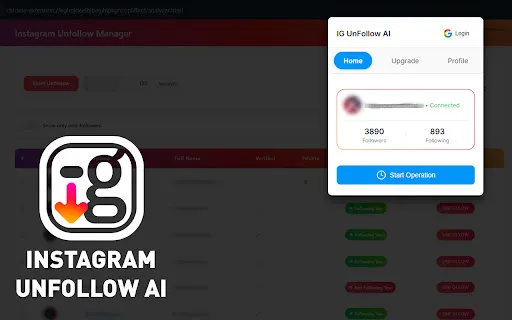

Instagram Unfollow AI
Unfollow AI compares your Instagram followers and following lists to surface accounts that do not follow you back, ghost followers, inactive profiles, and suspected bots. From a single view, you can bulk-unfollow selected non-followers, protect chosen accounts with a whitelist, and skip verified profiles. The Chrome extension also tracks unfollower changes with browser notifications and keeps data in your browser; it supports Chrome and other Chromium browsers.
Ads
What is Instagram Unfollow AI?
Unfollow AI is a Chrome extension for reviewing and managing Instagram follow relationships. It compares your followers and following lists to identify non-mutual accounts, ghost followers, inactive profiles, and suspected bots. You can bulk-unfollow accounts with smart delays intended to protect against Instagram rate limits, whitelist profiles to keep them out of bulk actions, and automatically skip verified accounts. The extension tracks unfollower changes, sends browser notifications, and maintains an unfollower history. It is compatible with Chrome, Brave, Edge, Opera, and Vivaldi, and is available in more than 50 languages. The product states that it does not require or store your Instagram password, uses Google OAuth login, and keeps data in your browser.
Who will use Instagram Unfollow AI?
- Instagram influencers
- Content creators
- Businesses managing Instagram accounts
- Instagram users who want to track unfollowers or remove non-mutual accounts
How to use the Instagram Unfollow AI?
- Step1: Install Unfollow AI from the Chrome Web Store in Chrome or another supported Chromium-based browser.
- Step2: Open the extension and sign in using its Google OAuth login.
- Step3: Let it compare your Instagram followers and following lists to identify non-followers, inactive accounts, and suspected bots.
- Step4: Review the results, whitelist accounts you want to keep, and choose whether to skip verified accounts.
- Step5: Bulk-unfollow selected accounts with smart delays, then use browser notifications and unfollower history to track changes.
Platform
- Chrome Extensions
Instagram Unfollow AI's Core Features & Benefits
The Core Features
- Compares Instagram followers and following to find non-mutual accounts
- Detects ghost followers, inactive accounts, and suspected bots
- Bulk-unfollows selected accounts with smart delays
- Tracks unfollowers with browser notifications and history
- Whitelists selected accounts and can skip verified profiles
- Supports more than 50 languages and multiple Chromium browsers
The Benefits
- Finds non-followers without manually comparing lists
- Helps manage an Instagram following list in bulk
- Protects selected accounts from accidental bulk unfollows
- Keeps users informed about follower changes
Instagram Unfollow AI's Main Use Cases & Applications
- Finding Instagram accounts that do not follow you back
- Cleaning up an Instagram following list
- Tracking accounts that unfollow you
- Identifying suspected bots, ghost followers, and inactive accounts
- Managing non-mutual follows for creator or business accounts
Instagram Unfollow AI's Pros & Cons
The Pros
Compares followers and following lists and surfaces non-mutual accounts
Offers bulk unfollowing with smart delays, plus whitelist and verified-account filters
Tracks unfollower history and sends browser notifications
Supports multiple Chromium browsers and more than 50 languages
States that Instagram passwords are not required or stored and data stays in the browser
The Cons
Designed specifically for Instagram rather than other social networks
Requires Chrome or another Chromium-based browser
Bulk-unfollow actions remain subject to Instagram rate limits, although smart delays are provided
FAQs of Instagram Unfollow AI
Instagram Unfollow AI Company Information
- Website:
- Company Name: Addons Chrome
- Support Email:
- Facebook:
- X(Twitter):
- YouTube:
- Instagram:
- Tiktok:
- LinkedIn:
Instagram Unfollow AI Reviews
5/5
Instagram Unfollow AI's Main Competitors and alternatives?
Unfollowed.lol
Superpowers for Instagram
Unfollower Tracker for IG
You may also like:

AI-matched coffee chat automation for communities, teams, mentorship, and alumni networking.
AI-powered WhatsApp group finder and automation for scalable broadcasting, lead detection, and safe account management.
AI-powered LinkedIn growth platform that learns your voice to create content, engage, and analyze performance.
Free WhatsApp link and QR generator with analytics, branded links, routing, and multi-agent chat features.
Plan and schedule social posts across multiple networks, then track engagement and manage conversations from one workspace.
Humanize, rewrite, and create undetectable AI-generated content easily.
Generate humorous, dramatic, and absurd quotes with Incorrect Quote Generator.
Turn long videos into captioned, vertical clips by detecting standout moments, then prepare them for social publishing.
Generate Twitter content templates using AI with the Leaf Chrome extension.
Boost productivity with BrowseWiz, your AI copilot for browsing.
Generate Amazon Affiliate deeplinks and AI posts effortlessly.
Turn your selfies into starring moments in GIFs, shows, and movies with AI-powered meme maker.