

LlamaChat
0
LlamaChat is a macOS application that lets you interact with your favorite LLaMA models, such as Alpaca and GPT4All, all running locally on your Mac.
Promote this Tool
Update this Tool
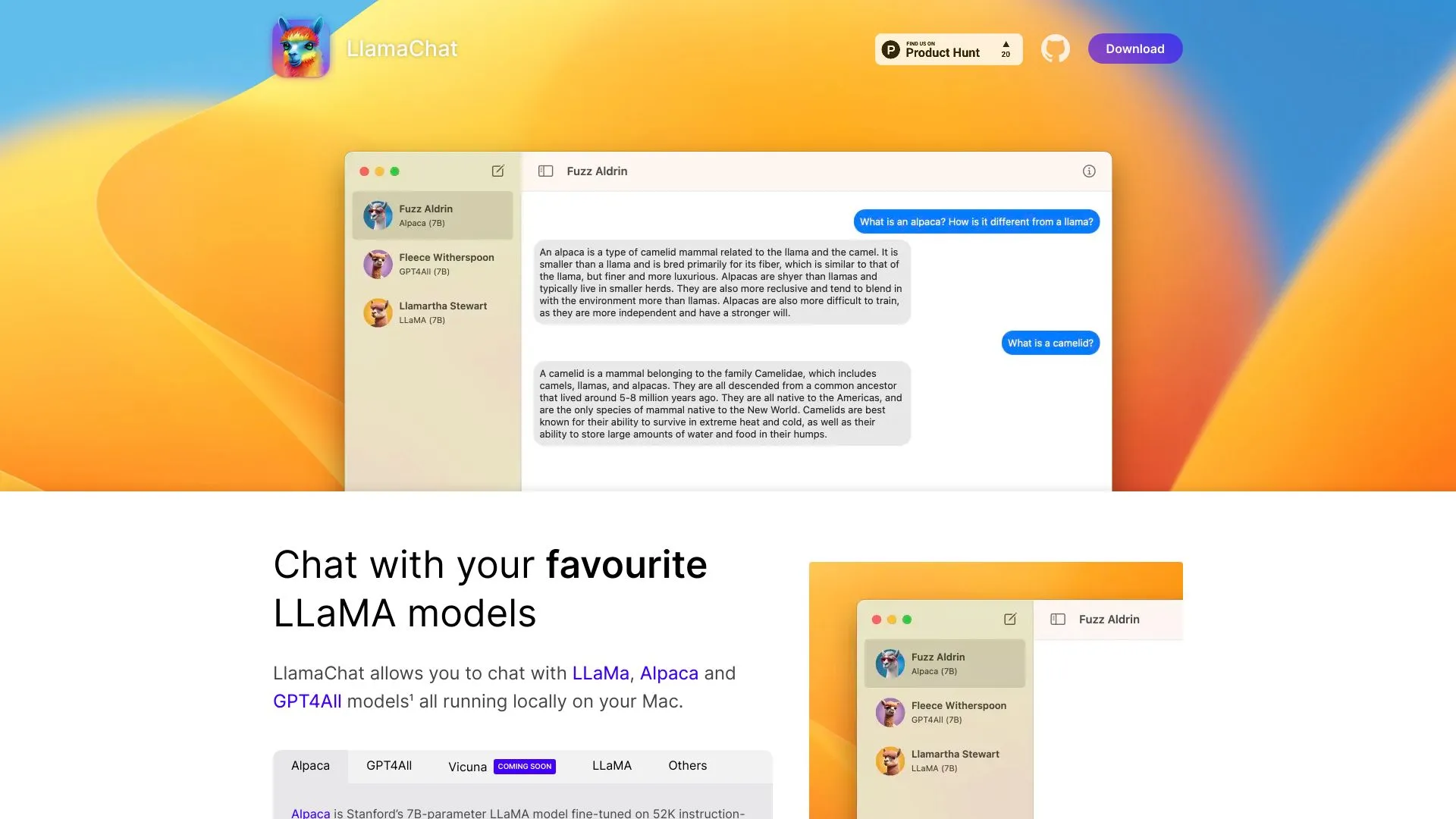
LlamaChat is a macOS application that lets you interact with your favorite LLaMA models, such as Alpaca and GPT4All, all running locally on your Mac.
Ads
What is LlamaChat?
LlamaChat is an open-source macOS app designed to facilitate interaction with LLaMA, Alpaca, and GPT4All models. By running these models locally on your device, LlamaChat ensures a seamless and private chatting experience. This tool is ideal for users who want to explore AI-based conversations without relying on cloud services, ensuring a focus on privacy and data security. The app provides an intuitive interface and robust performance, making it simple to engage with advanced language models.
Who will use LlamaChat?
- AI Researchers
- Developers
- Educators
- AI Enthusiasts
- Data Privacy Advocates
How to use the LlamaChat?
- Step1: Download and install LlamaChat from the official website.
- Step2: Launch the application on your macOS device.
- Step3: Select the model you wish to interact with (e.g., LLaMA, Alpaca, GPT4All).
- Step4: Start typing your queries or messages in the chat window.
- Step5: Review and interact with the model's responses in real-time.
Platform
- Mac
LlamaChat's Core Features & Benefits
The Core Features
- Local model hosting
- Support for LLaMA, Alpaca, and GPT4All
- User-friendly interface
- Real-time responses
- Privacy-focused
The Benefits
- Data privacy and security
- No reliance on cloud services
- Rich conversational experience
- Support for multiple models
- Open-source flexibility
LlamaChat's Main Use Cases & Applications
- AI-based customer support
- Interactive learning environments
- Virtual assistance
- AI research and development
- Privacy-conscious AI interactions
LlamaChat's Pros & Cons
The Pros
Supports multiple local LLM models like LLaMA, Alpaca, and GPT4All.
Fully open-source and free to use.
Runs locally on Mac, providing privacy and offline capabilities.
Supports both Intel and Apple Silicon Macs.
Uses popular open-source libraries like llama.cpp and llama.swift.
The Cons
Mac only, no support for other operating systems currently.
Requires macOS 13 or later.
Does not come with any model files; users must obtain and integrate models themselves.
Limited information on user support or community size.
LlamaChat's Pricing
| Has free plan | YES |
|---|---|
| Free trial details | |
| Pricing model | Free |
| Is credit card required | No |
| Paid from | |
| Has lifetime plan | No |
| Billing frequency |
FAQs of LlamaChat
LlamaChat Company Information
- Website:
- Company Name: LlamaChat
- Support Email:
- Facebook:
- X(Twitter):
- YouTube:
- Instagram:
- Tiktok:
- LinkedIn:
Analytic of LlamaChat
Visit Over Time
Monthly Visits
2.0K
Avg Visit Duration
00:00:00
Page Per Visit
1.13
Bounce Rate
37.86%
Jul 2026 - Sep 2026 All Traffic
Geography
Top 1 Regions

United States
1%
Jul 2026 - Sep 2026 Worldwide Desktop Only
Traffic Sources
Direct
39.20%
SearchOrganic
30.47%
Referrals
10.41%
SocialOrganic
5.44%
DisplayAds
3.86%
Mail
3.70%
Affiliate
2.97%
GenAi
1.65%
SearchPaid
1.54%
SocialPaid
0.76%
Sep 2026 Desktop Only
Top Keywords
| Keyword | Traffic | Cost Per Click |
|---|---|---|
| llama | 220.0k | $1.70 |
| llama app | 940 | — |
| llama chat | 460 | — |
| alamatch | 360 | — |
| app llama | 290 | — |
LlamaChat Reviews
5/5
LlamaChat's Main Competitors and alternatives?
ChatGPT
Google Bard
Microsoft Azure OpenAI
Replicate
Clarifai
You may also like:
Connect AI agents to models, social data, web tools, and workflows through one API key and inspectable execution flow.
Turn text into typed yes/no, choice, and score decisions with calibrated confidence for routing, triage, and evaluation.
SeedRouter lets developers call image, video, language, and audio models through one API key with usage-based billing.
Compare providers, route requests, and use major language, image, video, and speech models through one OpenAI-compatible API.
Call multiple leading language models through one OpenAI-compatible API, compare rates, isolate keys, and connect existing developer workflows.
Route requests across 100+ AI models through one OpenAI-compatible API, with automatic failover and live per-token usage visibility.
Without a gateway, every employee secures and controls its own AI traffic — or no one does.
Summarize 200-page reports into key findings, risks, and action items using the online Kimi K3 chat.
A unified AI API gateway offering discounted access to leading text, image, and video models.
OpenAI-compatible API marketplace with fingerprint verification, unified billing, and cost-optimized routing for developers.
Enterprise LLM platform with unified API access, intelligent routing, and model risk protection.
CodingPlanX provides a single API key gateway to access 600+ LLMs, reducing cost and simplifying integration.
DeepSeek V4 AI: a fast 6B model with 1M context for high-fidelity video and visual content generation.
APIMart offers unified access to 500+ AI models including GPT-5 and Claude 4.5 with cost savings.
Run language models with low-latency inference and OpenAI-compatible APIs for responsive applications, agents, coding tools, and search.
Run open models on your computer or cloud, then connect them to desktop apps, coding agents, and applications through APIs.