
- Up to 5 users
- Email, SMS, social accounts
- Team spaces and inboxes
- Conversations and tasks
- SOC 2 Type II compliance

Missive
0
Missive brings team email into a shared workspace where colleagues can discuss messages privately, coordinate who is handling each conversation, and turn emails into trackable tasks. Teams can use dedicated shared inboxes, internal statuses, tags, and task views to organize work. Automations handle repeatable actions, while integrations bring context from other apps into the inbox. Its assistant can gather context from connected tools before helping with a response.
Promote this Tool
Update this Tool
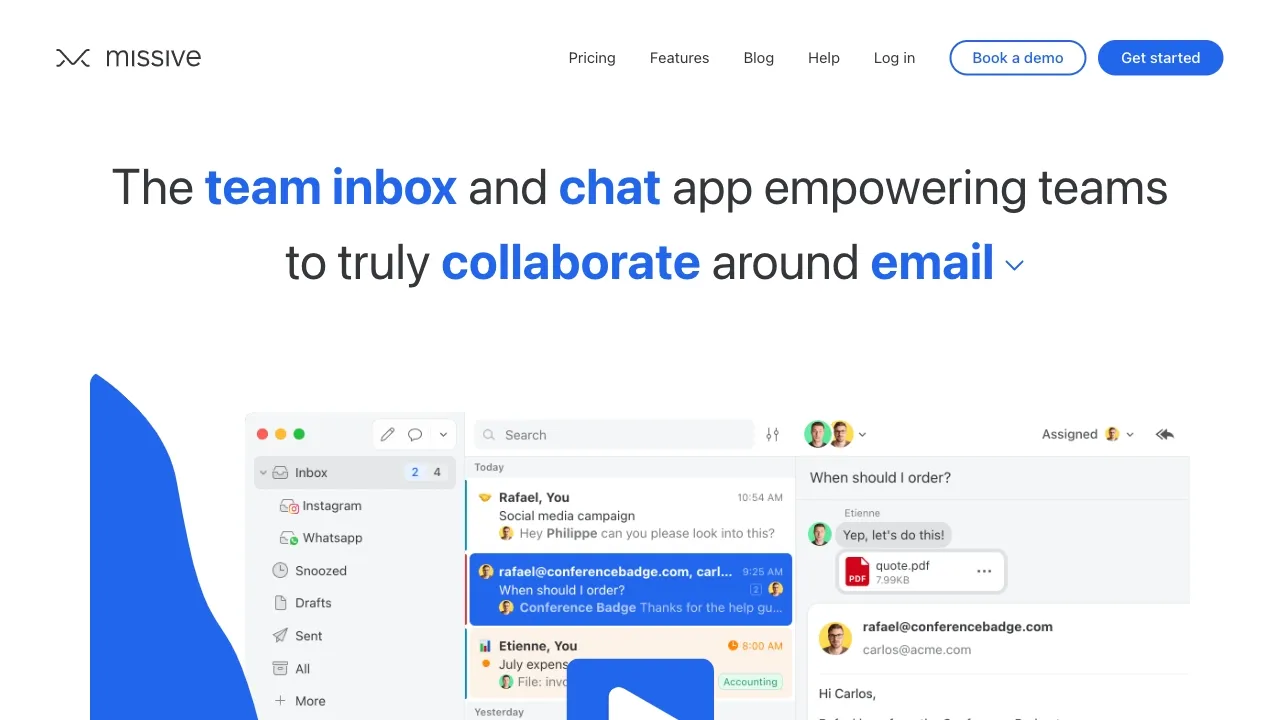
Missive brings team email into a shared workspace where colleagues can discuss messages privately, coordinate who is handling each conversation, and turn emails into trackable tasks. Teams can use dedicated shared inboxes, internal statuses, tags, and task views to organize work. Automations handle repeatable actions, while integrations bring context from other apps into the inbox. Its assistant can gather context from connected tools before helping with a response.
Ads
What is Missive?
Missive combines email with collaboration tools for teams that need shared visibility into customer conversations. Teammates can discuss an email internally before replying, use shared inboxes and team spaces, and apply internal statuses to keep people informed without putting them in charge of the response. Emails can become tasks, letting teams see what is being handled and keep important messages organized with tags. Automations apply rules to recurring manual work, while integrations bring information from other apps into the inbox. Teams can customize layouts, shortcuts, and templated replies to fit their workflow. The AI assistant gathers context before drafting and can connect to tools such as a CRM or Stripe through MCP. Its work remains centered on email and inbox-based coordination.
Who will use Missive?
- Customer support teams
- Sales teams
- Small businesses that manage customer conversations by email
- Professional services teams
- Accounting, legal, real estate, and logistics teams
How to use the Missive?
- Step1: Create a Missive account and set up a workspace for your team.
- Step2: Organize team work with shared inboxes and dedicated team spaces.
- Step3: Discuss messages internally and use statuses or tags to coordinate attention.
- Step4: Turn emails into tasks so the team can track who is handling the work.
- Step5: Set up automations and integrations to support recurring workflows and bring in context.
- Step6: Use the assistant to gather connected information before working on a response.
Platform
- Web
- Android
- iOS
- Mac
- Windows
Missive's Core Features & Benefits
The Core Features
- Shared inboxes and team spaces
- Internal conversations on email threads
- Email-to-task coordination and task views
- Internal statuses and tags
- Rules-based automations
- App integrations and a context-gathering AI assistant
The Benefits
- Give teammates visibility into who is handling each conversation
- Coordinate responses without moving discussion outside the email thread
- Keep follow-up work and important messages organized
- Reduce repetitive manual inbox tasks
- Bring relevant app context into email workflows
Missive's Main Use Cases & Applications
- Managing customer support inboxes as a team
- Coordinating sales conversations and follow-ups
- Sharing email work across professional services teams
- Routing and tracking customer messages in small businesses
- Collaborating on email workflows in accounting, legal, real estate, and logistics
Missive's Pros & Cons
The Pros
Combines shared inboxes, internal email discussion, and task tracking in one workspace.
Supports team visibility through internal statuses, tags, and task views.
Offers automations, integrations, and customizable layouts and shortcuts.
The assistant can gather context from connected tools before helping with a response.
The Cons
Its collaboration and task workflows are centered on email rather than serving as a general-purpose project-management workspace.
Missive's Pricing
| Has free plan | YES |
|---|---|
| Free trial details | 30 days risk-free trial with no credit card required |
| Pricing model | freemium |
| Is credit card required | No |
| Paid from | 14 USD |
| Has lifetime plan | No |
| Billing frequency | Monthly |
Details of Pricing Plan
Starter
14 USDProductive
24 USD- Up to 50 users
- All Starter features
- Integrations with external tools
- Rules & automations
- Basic analytics & reporting
- API access
Business
36 USD- Unlimited users
- All Productive features
- SAML and SSO
- IP restriction
- Advanced analytics & reporting
- Personalized team onboarding
Discount:20% off when billed yearly
For the latest prices, please visit: https://missiveapp.com/pricingFAQs of Missive
Missive Company Information
- Website:
- Company Name: Missive
- Support Email:
- Facebook:
- X(Twitter):
- YouTube:
- Instagram:
- Tiktok:
- LinkedIn:
Analytic of Missive
Visit Over Time
Monthly Visits
630.3K
Avg Visit Duration
00:16:46
Page Per Visit
17.85
Bounce Rate
23.38%
Jul 2026 - Sep 2026 All Traffic
Geography
Top 5 Regions

United States
49.45%
Sri Lanka
8.09%
Philippines
7.36%
United Kingdom
6.45%
India
4.6%
Jul 2026 - Sep 2026 Worldwide Desktop Only
Traffic Sources
Direct
77.61%
SearchOrganic
10.42%
Mail
3.69%
Referrals
3.27%
SocialOrganic
3.12%
GenAi
0.89%
SearchPaid
0.77%
DisplayAds
0.19%
SocialPaid
0.05%
Sep 2026 Desktop Only
Top Keywords
| Keyword | Traffic | Cost Per Click |
|---|---|---|
| missive | 33.5k | $1.30 |
| missive email | 1.0k | $10.84 |
| missive support ticket system triage | 540 | — |
| missive app | 910 | $3.24 |
| missav | 5129.6k | $1.07 |
Missive Reviews
5/5
Missive's Main Competitors and alternatives?
Front
Hiver
Freshdesk
Gmelius
Trengo
Zendesk
Intercom
Hubspot Service Hub
Microsoft Teams
Help Scout
You may also like:
Panzoe organizes schedules, email, documents, tasks, and connected apps through one shared AI memory and daily briefing.
Zens AI answers SaaS questions, identifies customers, and turns recurring feedback into actionable product and engineering workflows.
Reduce law firm admin by running intake, matter updates, email filing, and deadlines through approved AI agents.
Windy is an AI agent that provides personalized recommendations and insights for various tasks.
An AI-powered Python tool that automatically categorizes, labels, and organizes incoming emails into meaningful folders.
Turn Lean repositories into theorem knowledge, train premise retrievers over time, and automatically attempt proofs for unfinished theorems.
A local AI email assistant using LLaMA to read, summarize, and draft context-aware replies securely on your machine.
Automatically curates content and drafts AI-powered newsletters based on topics, templates, and schedules.
Turn revenue signals into prioritized seller actions, deal-risk insights, and coordinated sales workflows across teams.
Python-based AI newsletter generator using Crew AI and ChatGPT to automate curated AI news content creation.
The Lobby AI facilitates engaging conversations and intelligent responses through conversational AI agents.
Nos Agent is an AI-powered assistant that automates customer interactions and support tasks.
IpyBox brings ChatGPT to Jupyter, enabling interactive AI chat, code execution, variable inspection, and result embedding.
Emma-X is an open-source framework to build and deploy AI chat agents with customizable workflows, tool integration, and memory.