
- 3 credits per day
- Standard model

Render a House
0
Render a House converts architectural sketches, floor plans, photos, and 3D models into photorealistic visualizations. Designers can refine materials and lighting, test different styles, and view a project under changing conditions. It supports model orbiting and saved camera views, site placement by address, and shareable browser links where clients can inspect designs and leave pinned comments. Renders can also be animated into camera transitions or lighting changes.
Promote this Tool
Update this Tool
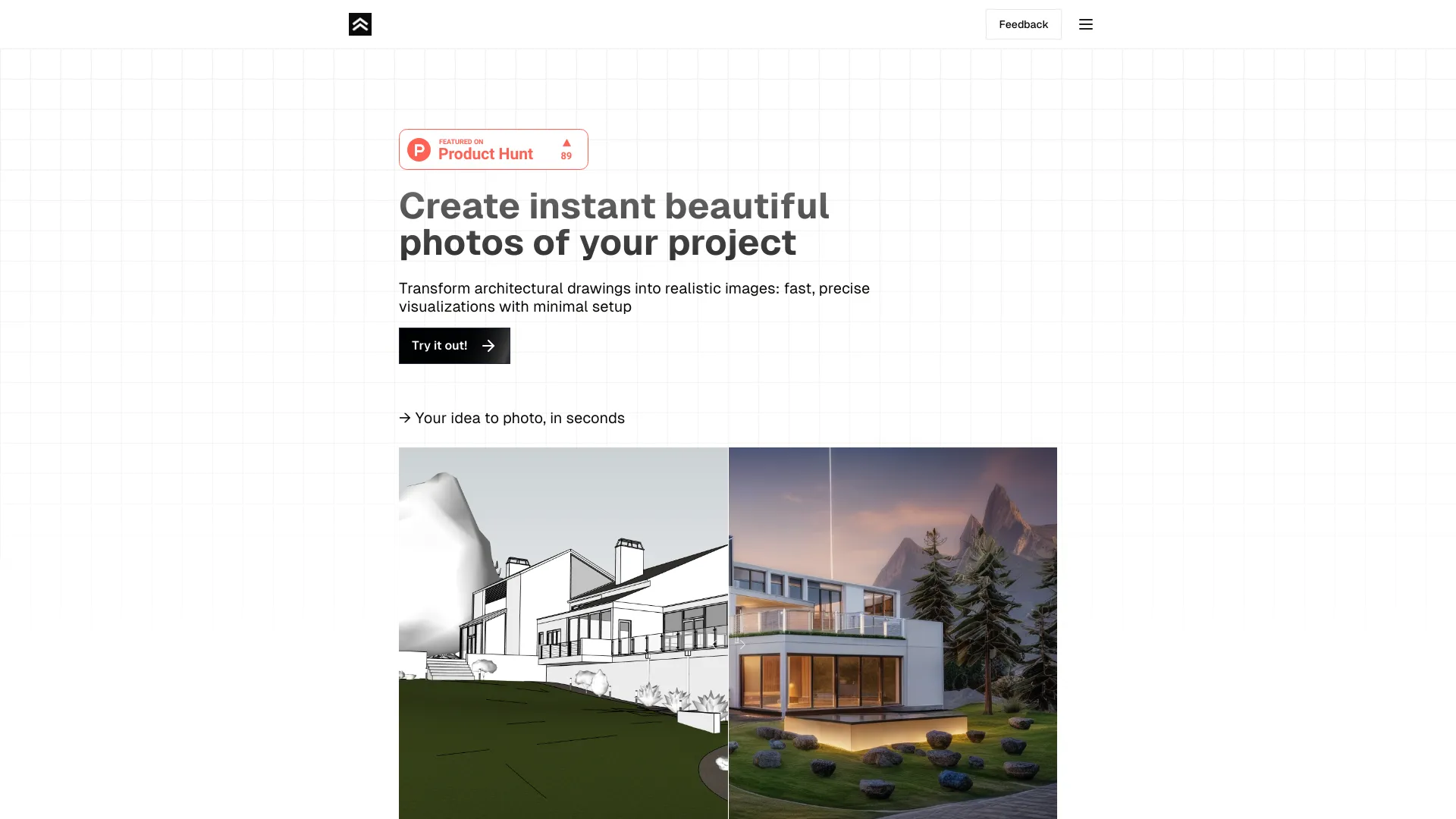
Render a House converts architectural sketches, floor plans, photos, and 3D models into photorealistic visualizations. Designers can refine materials and lighting, test different styles, and view a project under changing conditions. It supports model orbiting and saved camera views, site placement by address, and shareable browser links where clients can inspect designs and leave pinned comments. Renders can also be animated into camera transitions or lighting changes.
Ads
What is Render a House?
Render a House transforms sketches, floor plans, photos, and 3D models into photorealistic architectural renders. Users can adjust materials, styles, and lighting, then compare conditions such as midday, golden hour, or night. They can import 3D models, orbit them, save camera views, and generate a render for each saved angle. The Real Site feature places a model at a specified address to show its surroundings. Shareable project links let clients view and orbit models in a browser and pin comments to a model or render. For motion, users can create a camera transition between two rendered views or animate a single view through changing light. Plans include credit-based rendering, with different credit costs for render quality, resolution, and video.
Who will use Render a House?
- Architects
- Architectural designers
- Interior designers
- Residential design professionals
- Small architecture teams and studios
- Clients reviewing architectural proposals
How to use the Render a House?
- Step1: Open Render a House in a browser and attach a sketch, floor plan, photo, or 3D model.
- Step2: Choose the design direction and adjust materials, style, and lighting.
- Step3: Generate a photorealistic render, then explore different lighting conditions or saved model views.
- Step4: For 3D models, orbit the model or set an address to view it in a real-world location.
- Step5: Share a project link so clients can inspect the model and leave pinned comments; create an animation if needed.
Platform
- Web
Render a House's Core Features & Benefits
The Core Features
- Render sketches, floor plans, photos, and 3D models as photorealistic architectural visuals
- Adjust materials, styles, lighting, and perspective
- Preview projects under different lighting scenarios
- Place 3D models at an address to view their real-world surroundings
- Orbit models, save camera views, and render saved views
- Share browser-based project links with pinned comments
- Create camera transitions between views and animate lighting
The Benefits
- Communicate design intent visually from early sketches and plans
- Compare material and lighting options without complex lighting setup
- Help clients review projects asynchronously through shared links
- Produce still renders and short motion outputs from architectural designs
Render a House's Main Use Cases & Applications
- Visualizing a house from a hand-drawn sketch or floor plan
- Producing photorealistic renders from 3D architectural models
- Comparing exterior materials and design styles
- Showing a project at different times of day
- Previewing a building design at its intended real-world location
- Sharing design reviews and collecting client feedback
- Creating camera-move or lighting-transition clips
Render a House's Pros & Cons
The Pros
Accepts several architectural inputs, including sketches, floor plans, photos, and 3D models.
Supports material, style, lighting, site, and camera-view exploration.
Browser share links allow clients to orbit models and pin comments, including on the Free plan.
Offers a Free plan with no credit card required to start.
The Cons
The Free plan provides only 3 credits per day and uses the Standard model.
Higher rendering volumes require paid plans with monthly credit allowances.
4K renders and video consume credits, so output volume depends on the selected plan and render type.
Render a House's Pricing
| Has free plan | YES |
|---|---|
| Free trial details | |
| Pricing model | freemium |
| Is credit card required | No |
| Paid from | 39 USD |
| Has lifetime plan | No |
| Billing frequency | monthly/yearly |
Details of Pricing Plan
Free
0 USDPro
39 USD- 240 credits per month
- Unlimited daily credits
- Rollover up to 2400 credits
- All features included
- $312 billed yearly
Studio
99 USD- 1000 credits per month
- Unlimited daily credits
- Rollover up to 10000 credits
- All features included
- $792 billed yearly
Discount:Get 4 months free on Pro and Studio plans when billed annually.
For the latest prices, please visit: https://www.renderahouse.comFAQs of Render a House
Render a House Company Information
- Website:
- Company Name: Renderahouse
- Support Email:
- Facebook:
- X(Twitter):
- YouTube:
- Instagram:
- Tiktok:
- LinkedIn:
Analytic of Render a House
Visit Over Time
Monthly Visits
158.3K
Avg Visit Duration
00:04:56
Page Per Visit
4.51
Bounce Rate
38.61%
Jul 2026 - Sep 2026 All Traffic
Geography
Top 5 Regions

Colombia
19.74%
Argentina
17.86%
Mexico
15.43%
Ecuador
6.8%
Chile
6.65%
Jul 2026 - Sep 2026 Worldwide Desktop Only
Traffic Sources
SearchOrganic
40.31%
Direct
30.61%
SocialOrganic
19.52%
Referrals
3.47%
SocialPaid
1.82%
SearchPaid
1.61%
GenAi
1.49%
Mail
0.77%
DisplayAds
0.21%
Affiliate
0.19%
Sep 2026 Desktop Only
Top Keywords
| Keyword | Traffic | Cost Per Click |
|---|---|---|
| render a house | 10.3k | $0.78 |
| render house | 5.1k | $0.76 |
| renderhouse | 3.0k | — |
| renderahouse | 1.2k | — |
| render house ai | 710 | — |
Render a House Reviews
5/5
Comments (1)

Sebastián Papanicolau
July 12 2025
Render a House just works, it's the only one that REALLY gets the job done
Render a House's Main Competitors and alternatives?
V-Ray
Lumion
Twinmotion
Blender
SketchUp
You may also like:
Generate realistic or anime feet images from prompts and presets, then download clean results without signing up or watermarks.
Generate and edit images from prompts and reference photos while preserving readable text, faces, products, and selected visual details.
Generate four Midjourney images per request through a managed REST API, with selectable aspect ratios and webhook-based result delivery.
AIClothSwap instantly swaps outfits in photos with realistic fabric, lighting, and pose preservation.
AI couple photo generator that turns two photos into romantic, photorealistic scenes in minutes.
An xAI-powered AI studio for generating photorealistic images, cinematic videos, and synced audio from simple prompts.
AI image generator for creating, editing, and enhancing visuals with accurate text rendering and 4K output.
GPT Image 2 is a fast AI image generator and editor for creating realistic visuals from prompts.
Free AI image generator with photorealistic output, sharp text rendering, and conversational editing.
OpenAI-powered image generation and editing tool for photorealistic visuals, accurate text rendering, and UI mockups.
An AI image generator and editor with photorealistic results, accurate text rendering, and strong prompt following.
An AI image editor and generator for fast text-to-image creation, reference-based edits, posters, and product visuals.
Prompt-first AI image generator and editor for creating polished visuals from text prompts and reference images.
An AI image generator and editor that creates photorealistic visuals, sharp text, and fast prompt-based refinements.
Prompt-driven AI image generator and editor for fast, controllable visuals, marketing assets, and creative iterations.
A text-to-image generator that turns detailed prompts into polished, publication-ready visuals quickly.
Next-generation AI image generator with near-perfect text rendering, photorealistic results, and native 4K output for creators and marketers.
Multi-modal AI platform that turns prompts, images, videos, and audio into cinematic visuals with synchronized sound.
An AI image generator with native text rendering, photorealistic results, and pixel-perfect consistency.
Upcoming OpenAI image model preview with stronger text rendering, photorealism, and native 4K generation.