
- View & record Smartsuit Pro II & Smartgloves mocap
- Rokoko Vision AI mocap for recordings up to 15 seconds
- Access clean up filters
- Export to .FBX
- Unlimited cloud asset storage

Rokoko Vision
0
Rokoko Vision converts a video of a person performing a movement into 3D motion data, without a motion-capture suit or markers. Upload a video to Rokoko Create, then bring the capture into Rokoko Studio to review, clean up, loop, or retarget it to a character. Export the finished animation as FBX or BVH for use in supported 3D tools and animation workflows.
Promote this Tool
Update this Tool
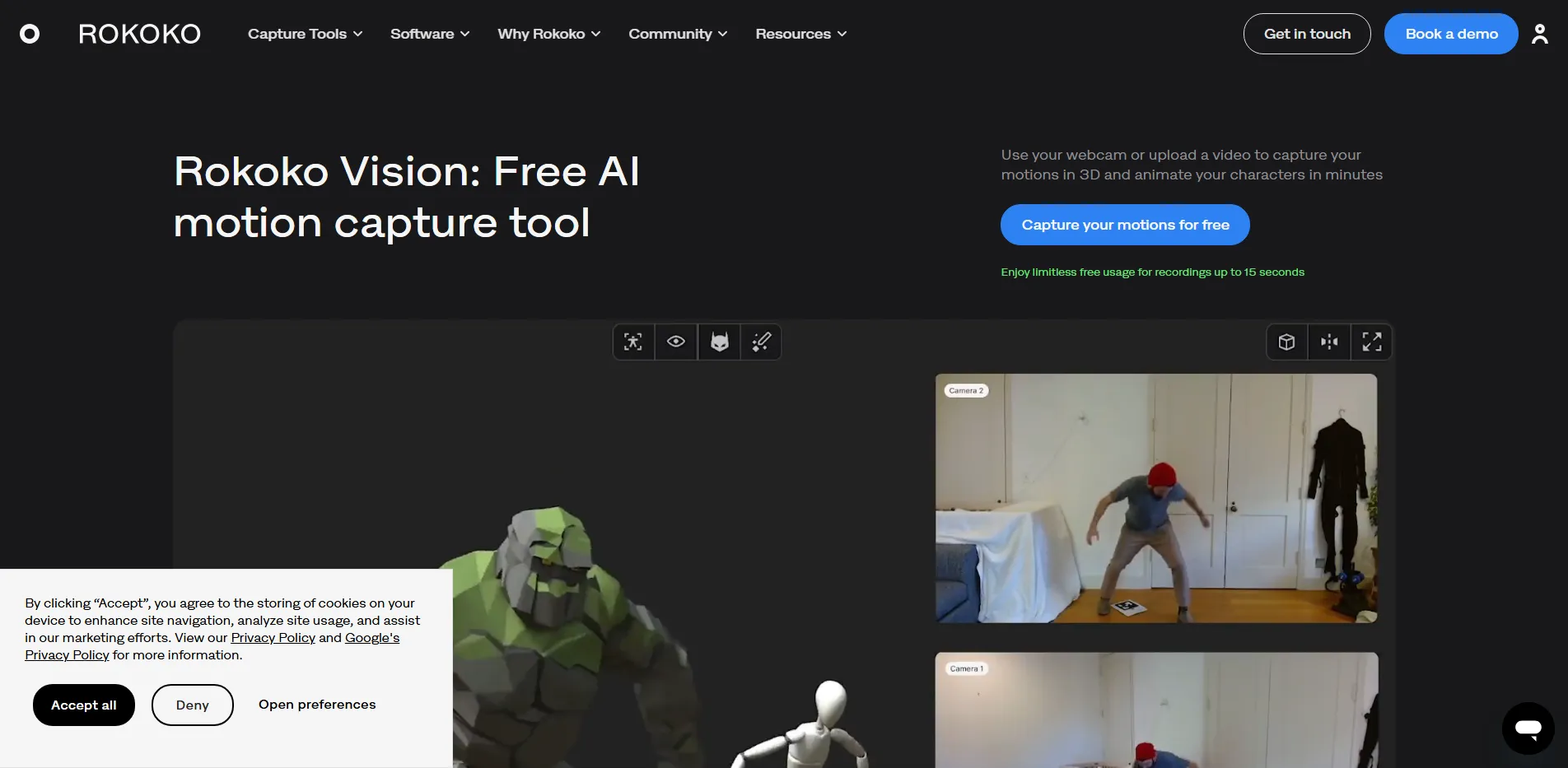
Rokoko Vision
Rokoko Vision converts a video of a person performing a movement into 3D motion data, without a motion-capture suit or markers. Upload a video to Rokoko Create, then bring the capture into Rokoko Studio to review, clean up, loop, or retarget it to a character. Export the finished animation as FBX or BVH for use in supported 3D tools and animation workflows.
Ads
What is Rokoko Vision?
Rokoko Vision is a video-based motion-capture tool within the Rokoko Create platform. Upload a recorded performance and its AI solver estimates body movement to create 3D animation data, without requiring a suit or tracking markers. The resulting capture can be opened in Rokoko Studio for viewing, cleanup, looping, and character retargeting. Studio supports motion exports as FBX or BVH, with skeleton options including HIK and Mixamo. The files can be used in tools such as Blender, Unreal Engine, Unity, Cinema 4D, Maya, Houdini, MotionBuilder, and iClone. Vision works from uploaded footage rather than live webcam capture. Its tracking depends on the performer remaining visible in the video; it does not currently provide finger tracking, and generated motion requires post-processing rather than real-time capture.
Who will use Rokoko Vision?
- 3D animators and character artists
- Independent game developers
- Film and VFX creators
- Previsualization teams
- Animation students and educators
- Creators exploring motion capture without dedicated capture equipment
How to use the Rokoko Vision?
- Step1: Record a video of a performer doing the movement you want to capture.
- Step2: Upload the video file to Rokoko Create for motion processing.
- Step3: Import the captured motion into Rokoko Studio to review, clean up, loop, or retarget it to a character.
- Step4: Select a supported skeleton and export the animation as FBX or BVH for use in a 3D tool.
Platform
- Mac
- Windows
Rokoko Vision's Core Features & Benefits
The Core Features
- Convert uploaded video into 3D motion data
- Process motion through Rokoko Create
- Review and clean up captures in Rokoko Studio
- Loop motion segments
- Retarget captures to a custom character
- Export motion as FBX or BVH
The Benefits
- Capture movement without a mocap suit or markers
- Turn existing recorded footage into animation data
- Refine and retarget motion before using it in a 3D workflow
- Move exported animation into supported tools such as Blender, Unity, and Unreal Engine
Rokoko Vision's Main Use Cases & Applications
- Creating character animation from recorded performances
- Previsualizing movement for film and VFX
- Producing game animation from video reference
- Learning and teaching 3D animation and motion capture
- Retargeting captured movement to a custom character
Rokoko Vision's Pros & Cons
The Pros
Creates 3D motion from a single video without a suit or markers
Includes a workflow for editing, cleanup, looping, and character retargeting
Exports FBX and BVH for use in common 3D animation tools
Suitable for turning recorded movement into animation and previsualization
The Cons
Requires a recorded video upload; webcam live capture is not available
Tracking quality can suffer when body parts are obscured or the performer leaves the frame
Does not currently support finger tracking
Motion is processed after capture rather than generated in real time
Rokoko Vision's Pricing
| Has free plan | YES |
|---|---|
| Free trial details | |
| Pricing model | freemium |
| Is credit card required | No |
| Paid from | 20 USD |
| Has lifetime plan | No |
| Billing frequency | Monthly |
Details of Pricing Plan
Starter
0 USDPlus
20 USD- All Starter features
- Live stream to Unreal, Blender, Maya etc.
- Rokoko Vision AI mocap, with unlimited recording length
- Import and retarget custom characters
- Advanced export options (.BVH, custom FPS, skeleton presets)
- Chat & email support: 48h first response time (business days)
- Studio Preview access: smoothing filter & loops
- Includes Face Capture
Pro
50 USD- All Plus features
- Face Capture
- Advanced command API
- 21 days of offline use
- UDP trigger messages
- Export to .CSV format
- Designated Customer Success Manager
- Studio Preview access: smoothing filter & loops
Enterprise
- All Pro features
- Custom services
FAQs of Rokoko Vision
Rokoko Vision Company Information
- Website:
- Company Name: Rokoko
- Support Email:
- Facebook:
- X(Twitter):
- YouTube:
- Instagram:
- Tiktok:
- LinkedIn:
Analytic of Rokoko Vision
Visit Over Time
Monthly Visits
304.2K
Avg Visit Duration
00:01:31
Page Per Visit
3.15
Bounce Rate
51.57%
Jul 2026 - Sep 2026 All Traffic
Geography
Top 5 Regions

United States
10.4%
China
9.71%
Japan
6.11%
Singapore
5.73%
Brazil
5.51%
Jul 2026 - Sep 2026 Worldwide Desktop Only
Traffic Sources
Direct
51.25%
SearchOrganic
33.14%
SocialOrganic
6.48%
GenAi
3.41%
Referrals
2.97%
SocialPaid
1.12%
SearchPaid
0.89%
Mail
0.54%
DisplayAds
0.21%
Sep 2026 Desktop Only
Top Keywords
| Keyword | Traffic | Cost Per Click |
|---|---|---|
| rokoko | 17.3k | $0.72 |
| rokoko vision | 1.6k | $2.83 |
| rokoko studio | 1.3k | $2.53 |
| rokoko video | 1.5k | — |
| rokoko blender addon | 910 | — |

How to install?
Rokoko Vision Reviews
5/5
Rokoko Vision's Main Competitors and alternatives?
Adobe Character Animator
MotionBuilder
Faceware
NVIDIA's Omniverse
You may also like:
Magi 2 makes 4–30 second 1080p AI videos with native sound, lip sync and shot cuts placed to the second.
Change people, outfits, products, backgrounds, or visual styles in existing 2–60-second videos while preserving original framing, motion, and audio.
Media.io AI Video Enhancer improves blurry, noisy, dark, or low-resolution videos with AI and upscales footage to 4k.
Create videos from prompts, images, or references, then edit scenes, generate images, and adjust output settings in one workspace.
Create videos and images from text or photos, with tools for kisses, outfits, motion control, extension, and background removal.
Multimodal AI video generator producing 4–15s 2K clips with native audio, plus point-and-change instruction editing.
Convert long videos into recap scripts, captions, voiceovers, and vertical clips for Shorts, TikTok, and Reels.
LyricVideoMaker turns songs into beat-synced lyric videos with AI transcription, visuals, previewing, and social exports.
AI-powered online tool that removes video watermarks quickly while preserving original video quality.
An AI video generator that creates cinematic, director-controlled videos with consistent characters and 1080p output.
An online AI studio for generating and transforming images, videos, and creative effects quickly.
A chat-based AI video generator that turns prompts, images, and clips into cinematic, editable videos.
AI-powered video creation platform for recording, editing, repurposing, and publishing professional videos in minutes.
Multi-modal AI video generator with native audio, consistent characters, and cinematic scene control.
An AI video generation platform that turns text prompts and images into cinematic videos in seconds.
An AI creative studio for generating cinematic videos with multimodal references, precise control, and editing.
Ella is an AI-powered video creation platform that generates, edits, captions, and exports content in one Chrome workspace.
A cinematic AI video generator that turns text and images into polished 1080p clips with sound.
AI-powered online tool to remove watermarks, text, subtitles, and objects from videos quickly.