
- GPU instance

Salad Transcription API
0
Salad Transcription API turns audio into text and structured transcript outputs for software and media workflows. Developers can request speaker identification, word-level timestamps, English translation, summaries, sentiment analysis, classification, or SRT captions. Custom vocabulary and LLM prompts support domain-specific terms and extraction tasks. The service offers an accuracy-focused batch API and a lower-latency option, with integrations for connecting transcription workflows to other services.
Promote this Tool
Update this Tool
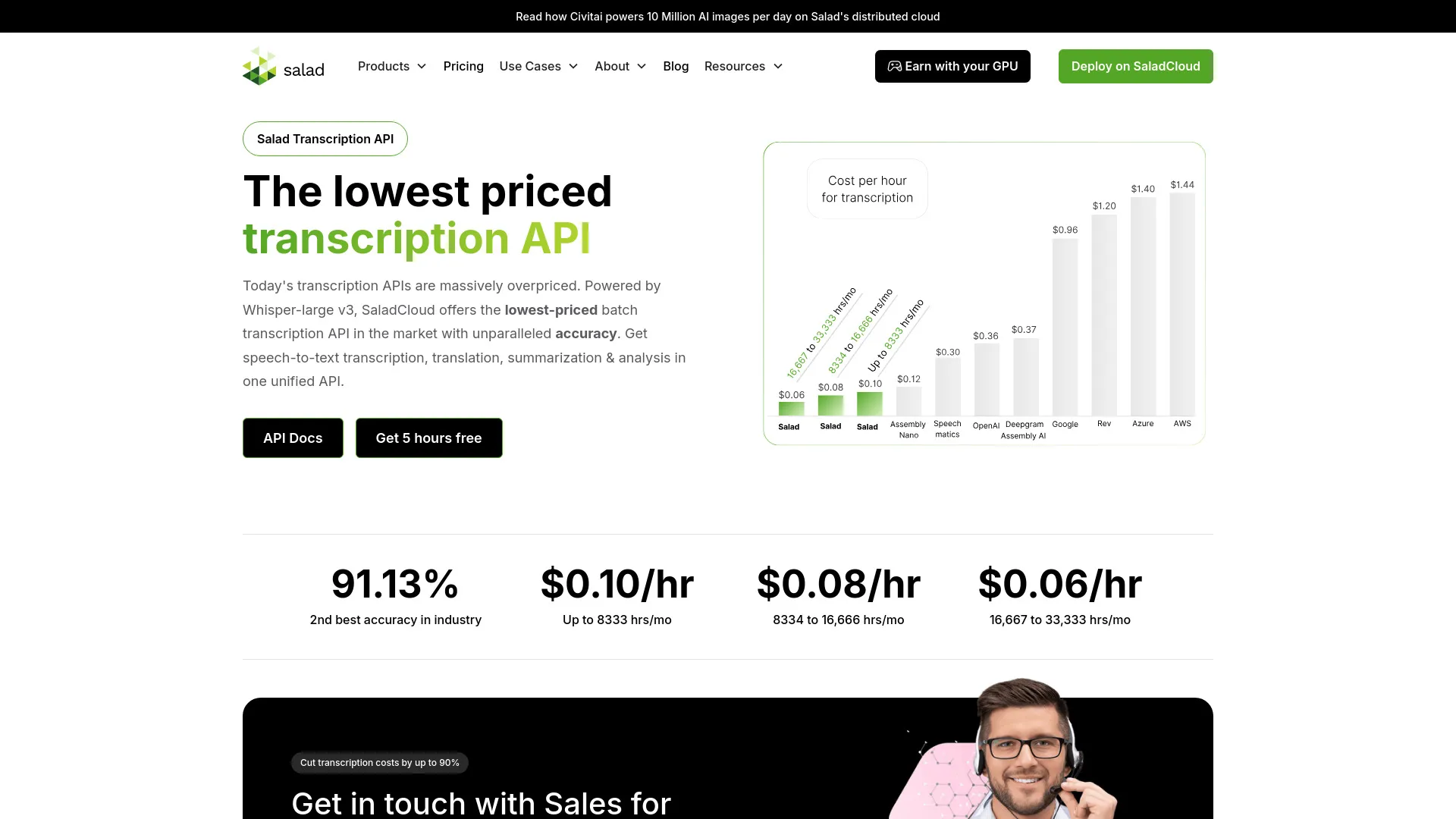
Salad Transcription API turns audio into text and structured transcript outputs for software and media workflows. Developers can request speaker identification, word-level timestamps, English translation, summaries, sentiment analysis, classification, or SRT captions. Custom vocabulary and LLM prompts support domain-specific terms and extraction tasks. The service offers an accuracy-focused batch API and a lower-latency option, with integrations for connecting transcription workflows to other services.
Ads
What is Salad Transcription API?
Salad Transcription API processes audio for speech-to-text workflows, returning transcripts with speaker identification and word-level timing. It can produce SRT captions for audio and video, translate 97 languages into English, and provide full translation between eight supported languages. Additional transcript processing includes summaries, sentiment and emotion detection, text classification, and structured extraction using custom LLM prompts. Custom vocabulary helps handle specialized terms, names, or product language. The service offers an accuracy-focused batch option and a lower-latency option with standard accuracy. Developers can connect it to workflows through Zapier and Pabbly Connect, including integrations with services such as Zoom, Notion, Dropbox, Google Drive, YouTube, and Vimeo. Enterprise customers can license models for on-premises or private-cloud deployment.
Who will use Salad Transcription API?
- Developers adding speech transcription to software products
- Teams processing large volumes of recorded audio
- Media teams generating transcripts and SRT captions
- Customer support and call-analysis teams reviewing recorded conversations
- Organizations translating spoken content into English
- Enterprise teams deploying transcription in private or on-premises environments
How to use the Salad Transcription API?
- Step1: Create an account through the Salad portal and review the transcription API documentation.
- Step2: Choose the accuracy-focused batch API or the lower-latency option for your workflow.
- Step3: Send audio for transcription through the API.
- Step4: Request outputs such as speaker identification, word-level timing, translation, summaries, sentiment analysis, classification, or SRT captions.
- Step5: Add custom vocabulary or LLM prompts when you need domain terms or structured extraction.
- Step6: Retrieve and use the results in your application or connect the workflow through Zapier or Pabbly Connect.
Platform
- Web
- Android
- Chrome Extensions
- iOS
- Linux
- Windows
Salad Transcription API's Core Features & Benefits
The Core Features
- Audio speech-to-text transcription
- Speaker identification and word-level timestamps
- Translation into English and between supported languages
- Summaries, sentiment analysis, emotion detection, and text classification
- SRT subtitle and caption output
- Custom vocabulary and LLM prompts
The Benefits
- Add transcription and transcript analysis to software through an API
- Generate timed transcripts and subtitle files from audio or video
- Adapt recognition and extraction to domain-specific terms
- Connect transcription workflows to commonly used business and media services
Salad Transcription API's Main Use Cases & Applications
- Transcribing recorded calls for review and analysis
- Creating captions and subtitles for audio and video
- Adding speech-to-text features to software products
- Translating spoken content into English
- Summarizing and classifying recorded conversations
- Extracting structured information from transcripts
Salad Transcription API's Pros & Cons
The Pros
Combines transcription with speaker identification, timestamps, translation, summaries, sentiment analysis, and captions.
Custom vocabulary and prompts support specialized terminology and structured extraction.
Offers both an accuracy-focused batch option and a lower-latency option.
Supports workflow connections through Zapier and Pabbly Connect.
The Cons
The accuracy-focused API is designed for batch transcription rather than the lowest-latency workflow.
Full translation between languages is available for eight supported languages; broader translation is into English.
Using the service in an application requires integrating with its API or a supported workflow connector.
Salad Transcription API's Pricing
| Has free plan | No |
|---|---|
| Free trial details | |
| Pricing model | usage-based |
| Is credit card required | No |
| Paid from | 0.02 USD |
| Has lifetime plan | No |
| Billing frequency | Hourly |
Details of Pricing Plan
GTX 1660 (6 GB)
0.03 USDRTX 3060 (12 GB)
0.06 USD- GPU instance
RTX 3070 (8 GB)
0.07 USD- GPU instance
RTX 4080 (16 GB)
0.13 USD- GPU instance
RTX 5090 (32 GB)
0.27 USD- GPU instance
8xA100 (40 GB PCle)
0.4 USD- GPU instance
8xA100 (80 GB SXM)
0.5 USD- GPU instance
FAQs of Salad Transcription API
Salad Transcription API Company Information
- Website:
- Company Name: Salad Technologies
- Support Email:
- Facebook:
- X(Twitter):
- YouTube:
- Instagram:
- Tiktok:
- LinkedIn:
Analytic of Salad Transcription API
Visit Over Time
Monthly Visits
646.0K
Avg Visit Duration
00:03:16
Page Per Visit
2.59
Bounce Rate
48.71%
Jul 2026 - Sep 2026 All Traffic
Geography
Top 5 Regions

United States
30.73%
United Kingdom
11.07%
India
8.51%
Canada
5.09%
Vietnam
4.22%
Jul 2026 - Sep 2026 Worldwide Desktop Only
Traffic Sources
Direct
59.27%
SearchOrganic
16.56%
SocialPaid
7.27%
SocialOrganic
4.53%
SearchPaid
3.17%
Referrals
3.01%
DisplayAds
2.62%
Mail
1.60%
GenAi
1.42%
Affiliate
0.54%
Sep 2026 Desktop Only
Top Keywords
| Keyword | Traffic | Cost Per Click |
|---|---|---|
| salad | 67.0k | $0.71 |
| saladcloud | 2.6k | $2.17 |
| salad ai | 1.7k | $0.99 |
| salad mining | 1.1k | $5.97 |
| salad gpu | 1.4k | $10.49 |
Salad Transcription API Reviews
5/5
Salad Transcription API's Main Competitors and alternatives?
Assembly AI
AWS Transcribe
Google STT
Microsoft Azure Speech-to-Text
Deepgram
You may also like:
AI-powered tool to transcribe audio, video, YouTube links, and recordings into accurate, searchable text.
Remove vocals, split stems, trim tracks, and turn recordings into readable text directly in your browser without installing software.
Turn video and audio into searchable transcripts with speaker labels, timestamps, 99-language support, and subtitle-ready exports.
Convert audio and video files into editable transcripts with speaker labels, timestamps, and exports in multiple formats.
Turn podcasts and YouTube videos into searchable transcripts with timestamps, summaries, mind maps, and transcript-grounded chat.
Convert video or audio into speaker-labeled transcripts online with word timestamps and five export formats.
Video Transcription AI converts videos, audio, links, and files into accurate searchable transcripts in seconds.
Free AI video transcription tool that converts videos and links into accurate text, subtitles, and summaries.
Free browser-based AI tool that transcribes audio and video into text, with multilingual support and no sign-up.
Instantly convert any video into clear summaries online, ideal for YouTube, Zoom, and MP4 files.
Browser-based international calling platform with pay-as-you-go credits, virtual numbers, and AI transcription.
Saveto AI is a free, all-in-one AI transcription tool that converts videos, audio, and links into accurate text.
Free AI-powered tool that instantly converts YouTube videos into editable, searchable transcripts and summaries.
AI-powered transcription converting audio and video into editable, accurate text in 100+ languages instantly.
NeatScribe provides fast, accurate AI transcription for audio and video in seconds, editable and downloadable.
Turbo Transcription AI offers fast, 99% accurate audio and video transcription powered by Gemini 3 Pro.
DeVoice converts audio and video into accurate text using advanced AI transcription technology.
Instant AI-powered transcription for TikTok videos with easy copying and bulk support.