
- 5 credits per day (login to claim)
- Standard quality output
- Community support
- Basic AI models
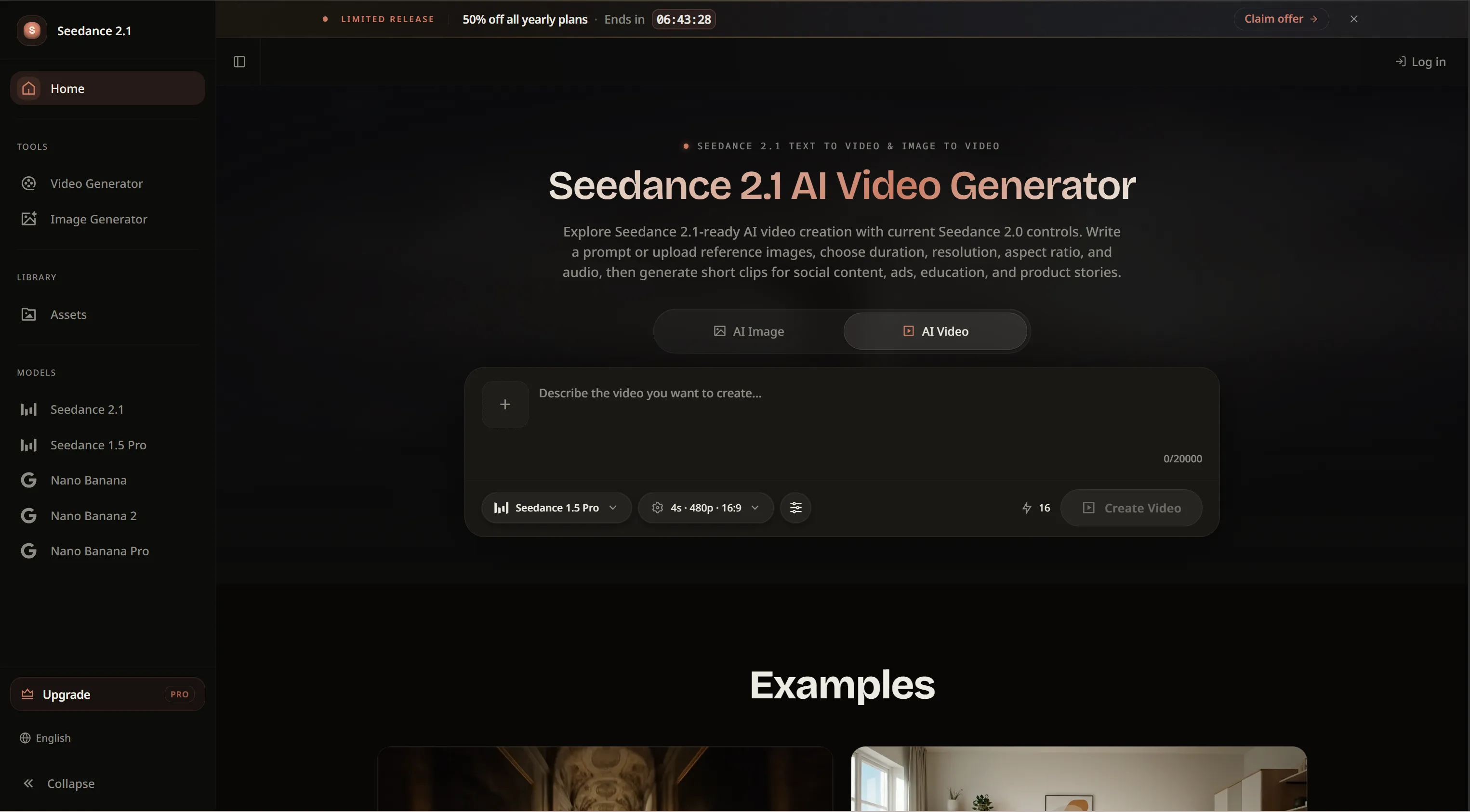
Seedance 2.1 is a browser-based AI content creation platform focused on text-to-video, image-to-video, and AI image generation. It lets users generate short cinematic clips, synchronized audio, and reference-based visuals for social media, ads, education, and product storytelling. The platform also offers multiple models, aspect ratios, and pricing tiers for creators and teams.
Promote this Tool
Update this Tool

Seedance 2.1 AI
Seedance 2.1 is a browser-based AI content creation platform focused on text-to-video, image-to-video, and AI image generation. It lets users generate short cinematic clips, synchronized audio, and reference-based visuals for social media, ads, education, and product storytelling. The platform also offers multiple models, aspect ratios, and pricing tiers for creators and teams.
Ads
What is Seedance 2.1 AI?
Seedance 2.1 is an AI creation platform for generating short videos and images directly in the browser. It supports text-to-video, image-to-video, reference-based creation, and AI image generation with multiple aspect ratios, durations, and resolutions. The platform emphasizes multimodal input, motion stability, camera control, native synchronized audio, and lip-sync for video, while image tools focus on fast generation, prompt fidelity, and high-resolution outputs. It is designed for creators who need quick drafts, social content, product visuals, storyboards, and marketing assets.
Who will use Seedance 2.1 AI?
- Content creators
- Social media marketers
- Video editors
- Advertisers
- Educators
- Product teams
- Designers
- Storytellers
- Motion concept artists
- Small businesses
How to use the Seedance 2.1 AI?
- Step1: Open the Seedance 2.1 website and choose the video or image generator.
- Step2: Select a model such as Seedance 2.1, Seedance 1.5 Pro, or a Nano Banana image model.
- Step3: Enter a detailed prompt or upload reference images and other media if needed.
- Step4: Set parameters such as duration, resolution, aspect ratio, and audio options.
- Step5: Generate the result and review the output.
- Step6: Refine the prompt or settings and regenerate until the result matches your needs.
Platform
- Web
Seedance 2.1 AI's Core Features & Benefits
The Core Features
- Text-to-video generation
- Image-to-video generation
- AI image generation
- Reference image support
- Multimodal input handling
- Native synchronized audio generation
- Lip-sync support
- Multi-shot camera storytelling
- Aspect ratio selection
- Resolution and duration controls
The Benefits
- Creates content quickly in the browser
- Reduces manual video editing work
- Helps produce social-ready clips and visuals
- Supports consistent characters, products, and styles
- Improves creative iteration with prompt-based control
- Useful for marketing, education, and storytelling workflows
Seedance 2.1 AI's Main Use Cases & Applications
- Social media videos
- Advertising creatives
- Product walkthroughs
- Educational explainers
- Storyboard and concept frame creation
- Short-form storytelling
- Talking-head and dialogue clips
- Marketing image assets
- Visual experiments
Seedance 2.1 AI's Pros & Cons
The Pros
Supports both video and image generation
Offers multimodal and reference-based workflows
Includes audio and lip-sync generation
Provides multiple resolutions and aspect ratios
Has free daily credits to start
The Cons
Video outputs are limited to short clips
Advanced use may require prompt tuning
Some features depend on paid plans
No native mobile or desktop app is indicated
Seedance 2.1 AI's Pricing
| Has free plan | YES |
|---|---|
| Free trial details | Free plan available with 5 credits per day (login required to claim). No explicit time-limited free trial is shown. |
| Pricing model | Freemium |
| Is credit card required | No |
| Paid from | 39 USD |
| Has lifetime plan | No |
| Billing frequency | Monthly |
Details of Pricing Plan
Free
0 USDBasic
39 USD- 400 credits/month
- Standard AI models
- HD resolution
- Email support
Pro
79 USD- 1,000 credits/month
- All AI models access
- HD & 4K resolution
- Priority queue
Max
149 USD- 2,300 credits/month
- All AI models access
- 4K & 8K resolution
- Priority queue
- Dedicated support
FAQs of Seedance 2.1 AI
Seedance 2.1 AI Company Information
- seedance21.io

How to install?
Seedance 2.1 AI Reviews
5/5
Seedance 2.1 AI's Main Competitors and alternatives?
Sora
Veo
Kling
Runway
Pika
Luma Dream Machine
You may also like:

Create and refine images, videos, audio, and 3D assets in one canvas, with conversational agents that retain project context.
Generate videos, images, and music from prompts or references in one workspace using shared credits and a centralized asset library.
Generate and refine images from text or references, with targeted edits, transparent backgrounds, and multilingual text rendered directly into designs.
Create watermark-free videos from text prompts or photos, with selectable models, aspect ratios, durations, and resolutions.
Turn a photo, text prompt, or reference image into a short AI video using templates and adjustable generation settings.
Generate 1K–4K images from text prompts, steer composition with up to 16 references, and render readable multilingual lettering.
TeraBox is an all-in-one AI workspace and cloud storage platform for creating presentations, writing content, generating
Create images and short videos from prompts or photos, switching among multiple generation models and reusable templates in one account.
Generate realistic or anime feet images from prompts and presets, then download clean results without signing up or watermarks.
Generate images and videos from text or visual references, with synchronized native audio and multi-shot character consistency.
Create images and videos from plain-language ideas, photos, and templates while Orylia selects a suitable model.
Generate and refine images from prompts and references, with natural-language edits, integrated typography, batch creation, and output up to 4K.
Create images or edit uploaded photos with one sentence, including readable text, multi-image blending, and 4K output.
Create and revise product visuals, posters, illustrations, and explanations from text prompts and reference images.
Create finished videos from prompts, photos, or references, including 4K exports with synchronized audio and multiple aspect ratios.
Generate illustrations, photos, posters, and product visuals from text or reference images, then upscale and edit them.
Create usable visuals from text prompts or reference images, then compare revisions and download the version that fits your brief.
Create high-definition images from text prompts, then refine photos with background removal, upscaling, expansion, and object erasing tools.
Generate detailed images, edit existing photos, and maintain recognizable products or characters across multiple visual scenes.
Generate and edit images from prompts and reference photos while preserving readable text, faces, products, and selected visual details.