
- Remove Ads/Popups
- Basic Chat Features
- Unlock AI Agents
- Voice Input
- Share Chats

Typing Mind
0
TypingMind brings chats with ChatGPT, Claude, Gemini, and other language models into one interface using your API keys. Switch providers, run parallel chats to compare answers, and organize conversations in folders and projects. It also supports document chat, web search, voice input and speech output, editable Canvas work, plugins, and custom AI agents. Conversation data is stored locally by default.
Promote this Tool
Update this Tool
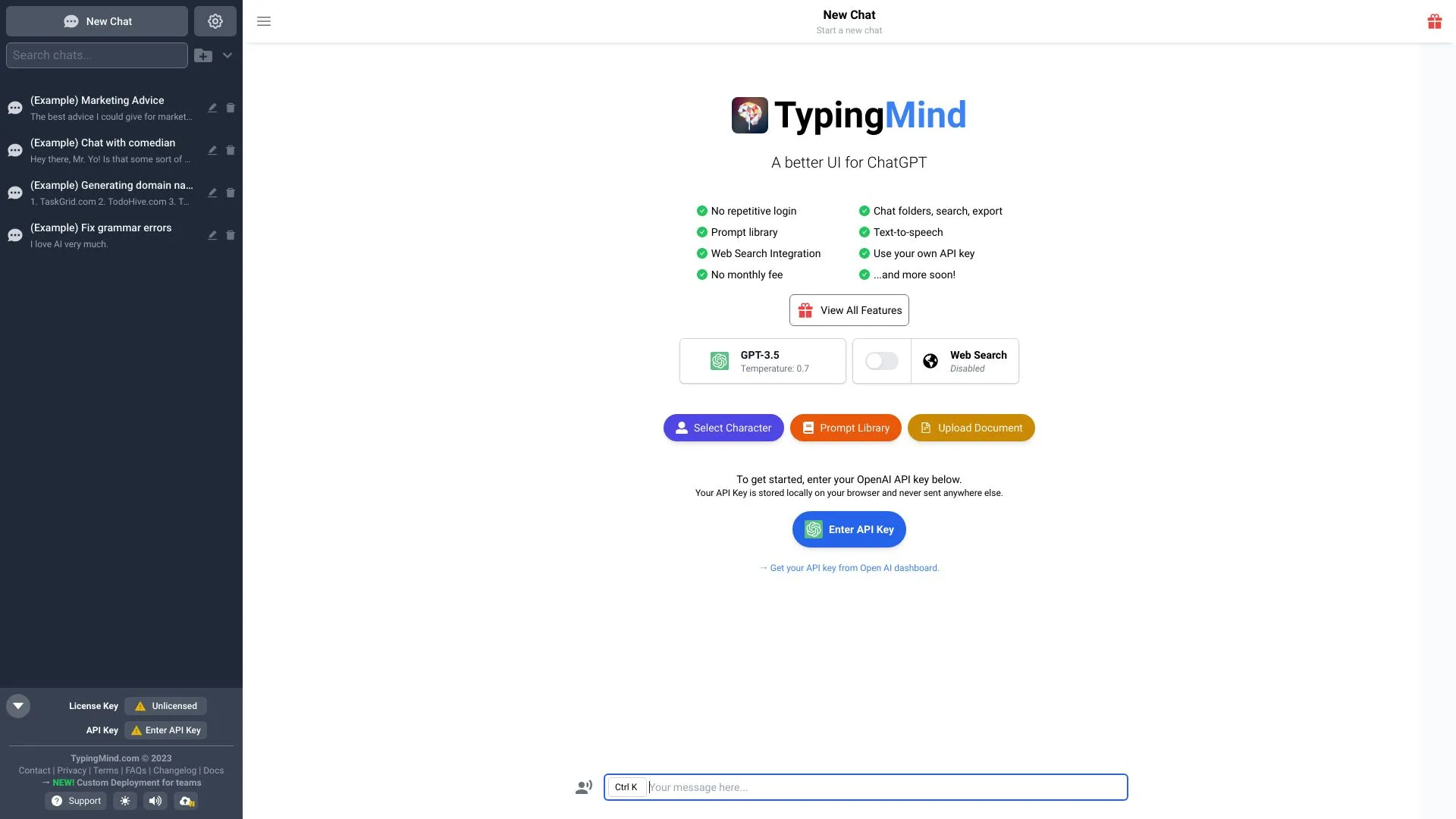
TypingMind brings chats with ChatGPT, Claude, Gemini, and other language models into one interface using your API keys. Switch providers, run parallel chats to compare answers, and organize conversations in folders and projects. It also supports document chat, web search, voice input and speech output, editable Canvas work, plugins, and custom AI agents. Conversation data is stored locally by default.
Ads
What is Typing Mind?
TypingMind is a chat interface for using multiple language models through your own API keys. Users can switch between providers or send a prompt to multiple models at once to compare responses. Chats can be organized with folders, projects, tags, search, and pinned items. The workspace supports document uploads, including PDFs, and lets users use web search and other plugins alongside chat. Canvas provides an interactive space for writing and coding, while artifacts can produce editable outputs such as documents and code. Users can also create custom AI agents with instructions, knowledge files, assigned models, and plugins. Voice input and text-to-speech are available. Conversations are stored locally by default, and the product offers cloud-sync controls.
Who will use Typing Mind?
- People who use multiple AI model providers
- Researchers and analysts who compare model responses or work with sources
- Writers and knowledge workers handling documents and ongoing projects
- Developers who use AI for coding and interactive Canvas work
- Teams building shared AI workspaces and custom agents
How to use the Typing Mind?
- Step1: Open TypingMind and enter an API key for a supported AI provider.
- Step2: Choose a model and start a chat, or select multiple models to compare their replies.
- Step3: Organize conversations in folders or projects and use search, tags, or pins to find them later.
- Step4: Add documents, web search, or plugins when a task needs reference material or connected tools.
- Step5: Create a custom AI agent by setting its instructions, model, knowledge files, and plugins.
Platform
- Web
Typing Mind's Core Features & Benefits
The Core Features
- Chat with multiple AI providers in one interface
- Run parallel chats to compare model responses
- Organize chats with projects, folders, tags, and search
- Chat with uploaded documents and use retrieval-augmented generation
- Use web search, plugins, and connected tools
- Create custom AI agents with knowledge files and prompt chains
The Benefits
- Keep conversations with different models in one workspace
- Compare answers without manually switching between separate chat interfaces
- Bring project documents and external information into AI workflows
- Reuse tailored agents and prompts for recurring tasks
- Keep data stored locally by default
Typing Mind's Main Use Cases & Applications
- Comparing responses from different language models
- Researching topics with web search and cited sources
- Reviewing and discussing uploaded documents
- Organizing ongoing writing, research, or coding work in projects
- Creating task-specific AI agents for repeatable workflows
- Using voice input and speech output for AI conversations
Typing Mind's Pros & Cons
The Pros
Combines access to multiple AI providers in one chat interface
Supports parallel model comparisons, document chat, web search, and plugins
Includes project organization and customizable AI agents
Stores data locally by default and encrypts API credentials with a password
The Cons
Users need to provide API keys and have access to the AI providers they want to use.
Typing Mind's Pricing
| Has free plan | No |
|---|---|
| Free trial details | |
| Pricing model | one-time |
| Is credit card required | No |
| Paid from | 39 USD |
| Has lifetime plan | YES |
| Billing frequency | Lifetime |
Details of Pricing Plan
Standard
39 USDExtended
79 USD- Image Generation
- Web Search
- Text-to-Speech
- Vision / Images
- Upload Documents
Premium
99 USD- Unlimited Plugins
- Project Folders
- Artifacts
- Multi-model chats
- Free Updates
Discount:50% off limited time offer on Premium plan
For the latest prices, please visit: https://typingmind.comFAQs of Typing Mind
Typing Mind Company Information
- Website:
- Company Name: TypingMind
- Support Email:
- Facebook:
- X(Twitter):
- YouTube:
- Instagram:
- Tiktok:
- LinkedIn:
Analytic of Typing Mind
Visit Over Time
Monthly Visits
472.3K
Avg Visit Duration
00:02:27
Page Per Visit
3.27
Bounce Rate
42.00%
Jul 2026 - Sep 2026 All Traffic
Geography
Top 5 Regions

France
35.23%
United States
16.86%
United Kingdom
6.38%
Vietnam
5.47%
Russia
3.98%
Jul 2026 - Sep 2026 Worldwide Desktop Only
Traffic Sources
Direct
70.48%
SearchOrganic
16.97%
Referrals
4.53%
SocialOrganic
3.19%
Mail
2.60%
GenAi
2.11%
Affiliate
0.07%
DisplayAds
0.05%
Sep 2026 Desktop Only
Top Keywords
| Keyword | Traffic | Cost Per Click |
|---|---|---|
| typingmind | 22.6k | $3.31 |
| typing mind | 3.5k | $4.05 |
| big pickle | 17.4k | $0.60 |
| typingmind ai | 780 | — |
| openai pricing | 39.6k | $3.31 |
Typing Mind Reviews
5/5
Typing Mind's Main Competitors and alternatives?
OpenAI ChatGPT
Claude AI
Azure OpenAI
You may also like:
Turn ideas, scripts, references, and assets into complete videos with planned scenes, consistent characters, and conversational revisions.
Turn one-sentence briefs into finished ads, films, posters, songs, voiceovers, and edits while Gigi plans and revises each piece.
SJinn is an AI-powered agent creating image, video, audio, and 3D content from descriptions.
Resea AI is an intelligent research AI agent that autonomously completes research and writing tasks quickly.
Imbue is an AI agent designed to enhance conversation and collaboration through intelligent dialogue.
Amazon Bedrock Agents enhance applications with AI capabilities like text generation and automation.
Eidolon AI is an intelligent agent that simplifies complex tasks through conversational AI.